
The week ahead,
already half filled in
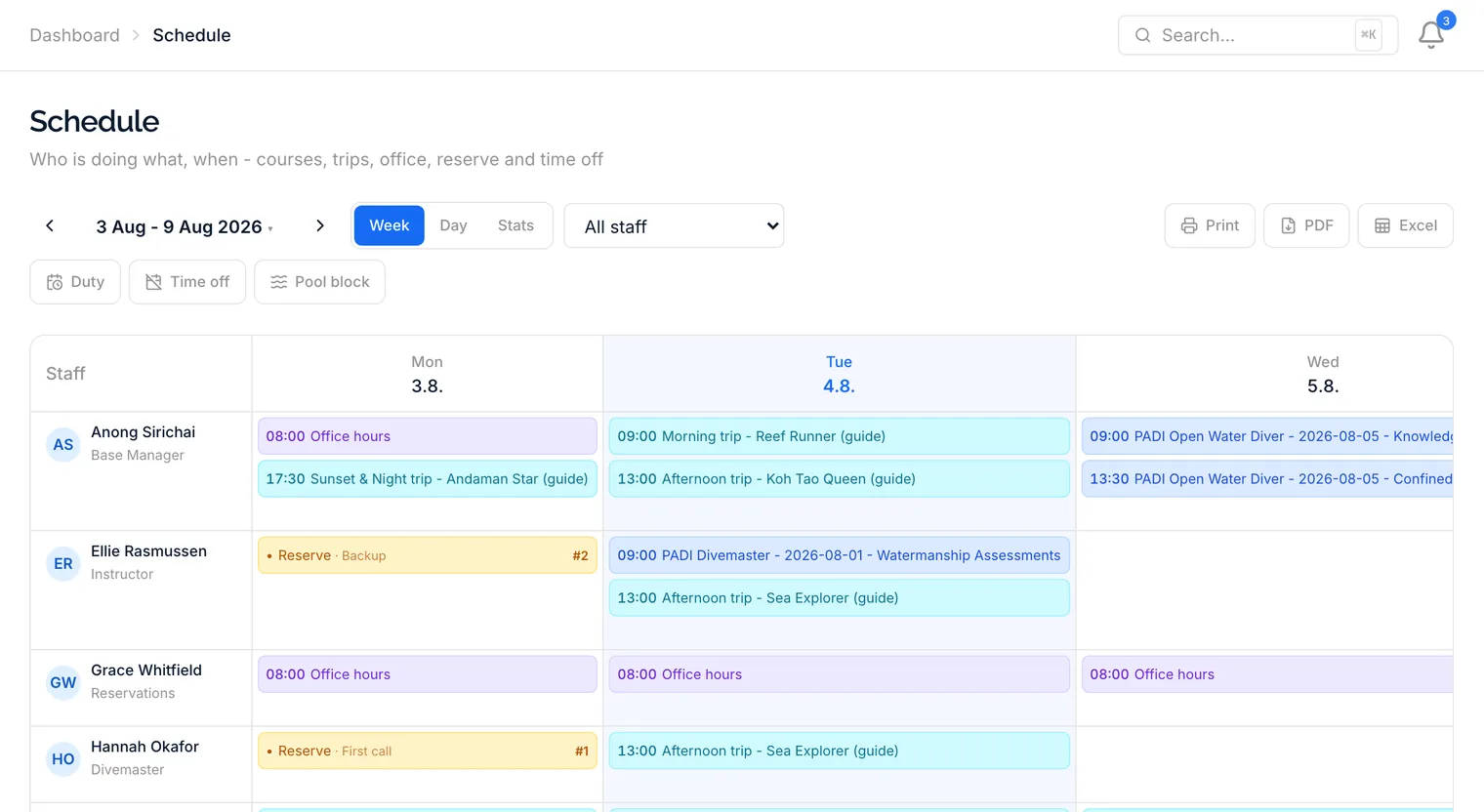
Trips and course sessions already know who is working them, so they appear on the board on their own. You add the rest - office shifts, reserve days, time off - and the overlaps get flagged before anybody turns up twice.
The whole week,
on one board
A row per staff member, a column per day. Trips and course sessions appear on the board by themselves, because they already know who is working them - you only add what the system cannot infer: office shifts, reserve days and time off.
- Week grid and single-day timeline
- Boat trips and course sessions fill in automatically
- Office hours, reserve days, time off and pool lanes
- Overlaps flagged before they become a problem
Built for the way a dive centre actually staffs
Guides, instructors and the person on the desk all sit on the same board, so the gap in Thursday afternoon is visible while there is still time to fill it.
Trips and courses place themselves
A trip with a boat master, a dive group with a guide, a course session with an instructor: each one already names a person, so it turns up on that person's row without anybody scheduling it twice.
Office and reserve duties
Put someone on the desk from 08:00 to 12:00, or on standby for the day. Reserve is a real assignment on the board rather than a name somebody remembers.
Time off that spans days
Vacation, sick days and single days off run as one bar across the week instead of repeating in every column, so a fortnight away reads as a fortnight away.
Conflicts surface immediately
Two things booked over the same person at the same hour are flagged on the board. Assigning a guide who is already on the morning boat tells you so before the day arrives.
Pool lanes on the same board
Pools get their own rows, with confined-water sessions and manual blocks side by side, so two courses never turn up for the same lane.
Print, PDF and Excel
The week prints on a sheet for the staff room, exports to PDF for a group chat, or to Excel when somebody wants to do their own sums with it.
Questions worth asking first
No. A trip already names its boat master and guides, and a course session names its instructor, so both appear on the board on their own. You only add office shifts, reserve days, time off and pool blocks.
Yes. Schedule access has an own-scope form, so a guide can be given their own row without the rest of the team's.
The week prints straight from the browser, exports to PDF, and exports to Excel if somebody wants to work with the numbers themselves.
Stop rebuilding the roster every Sunday
The board is part of every plan. Put your week on it during the free trial and see how much of it fills itself in.